
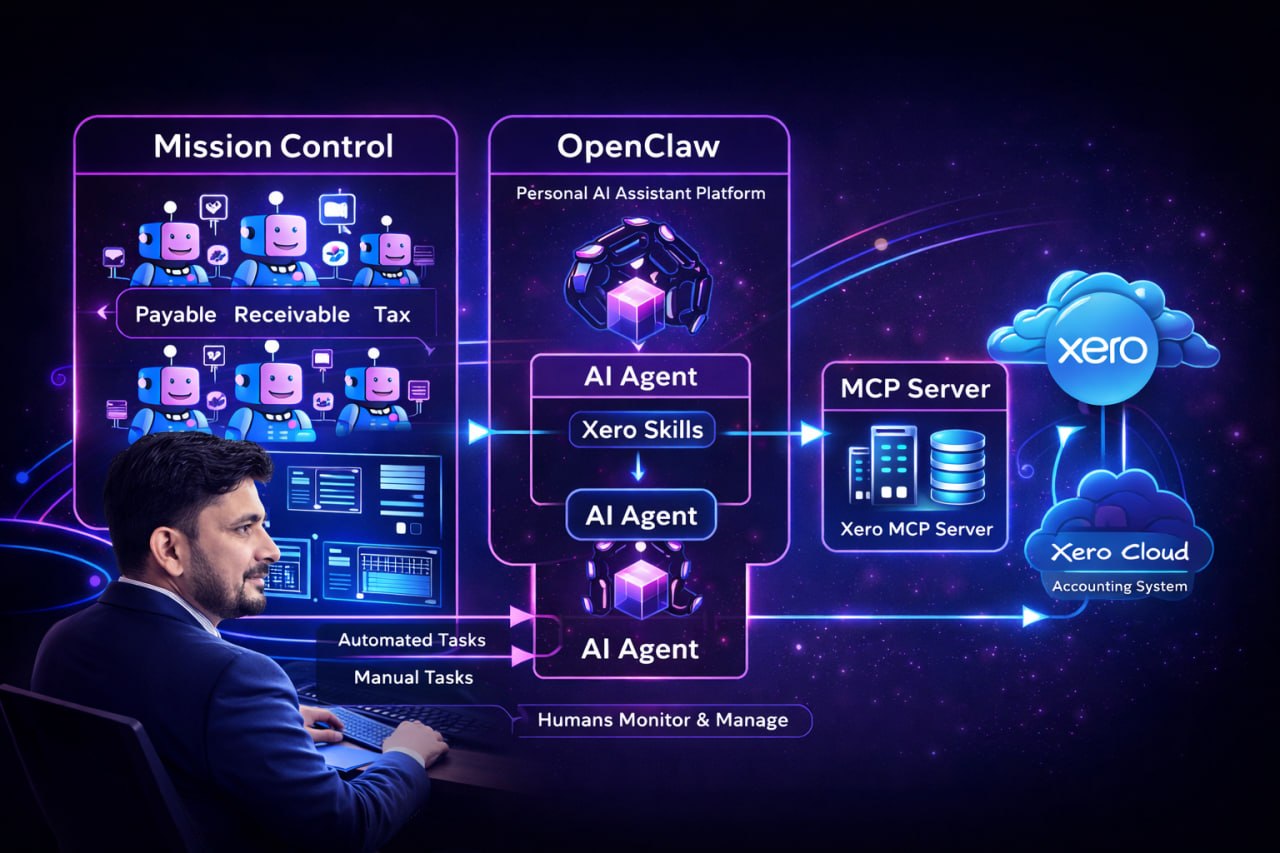

I built an AI accounting team over a single weekend using OpenClaw AI, the Model Context Protocol, and Xero accounting software. The goal was practical: let OpenClaw agents operate accounting systems while humans supervise, approve, and guide the work. The prototype came together faster than expected, and it revealed a clear operating model for finance teams that want automation without losing control.
This article explains the architecture, the responsibilities of each OpenClaw agent, and the human in the loop workflow that keeps everything safe. It also includes a concise MCP server setup for Xero, plus why this matters for modern finance teams that are evaluating AI systems.
The Weekend Experiment
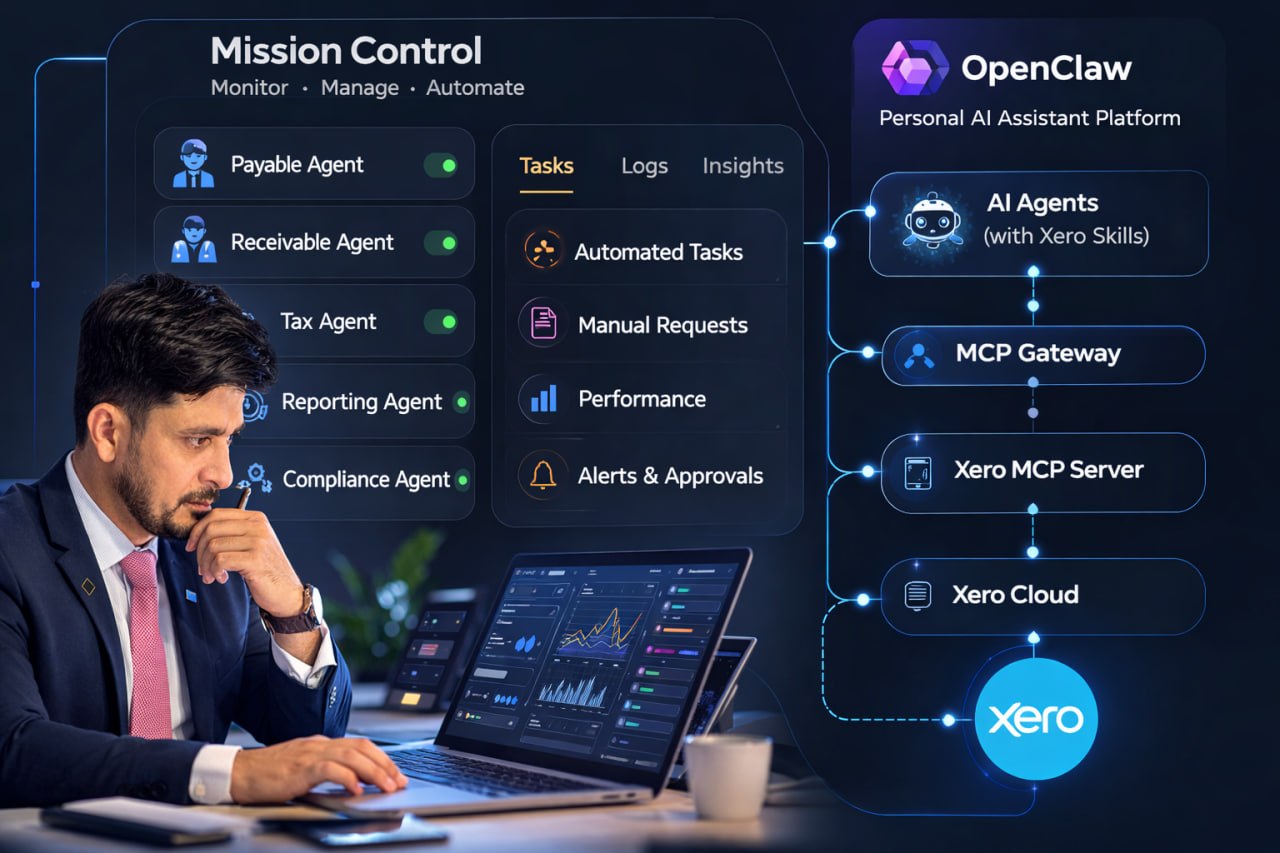
I approached the experiment like a focused build sprint: could I create a small team of AI accountants that can execute real tasks in Xero, while I supervise from a single dashboard. Using OpenClaw setup and OpenClaw skills, I created agents for payables, receivables, tax, reporting, and compliance. Each agent had a bounded tool set and a clear responsibility, which made the system easier to monitor and audit.
The surprising result was speed. With the OpenClaw gateway and MCP server in place, the AI agents could act like a real team within hours. That is why this matters: the bottleneck is no longer tooling, it is how we design the operating model.
The Architecture: Five Layers That Keep It Safe
The stack is intentionally layered to separate supervision, agent execution, and external systems. This also improves OpenClaw security and makes it easier to document and extend the system in OpenClaw docs and documentation.
1) Mission Control
Mission Control is where humans monitor and manage the AI accounting team. It is a control tower that shows what each OpenClaw agent is doing and requires approvals for sensitive actions. It becomes the primary workspace for finance leaders rather than logging directly into Xero.
2) OpenClaw
OpenClaw hosts the agents and their capabilities. Each OpenClaw agent has a defined role and a curated set of OpenClaw skills. The OpenClaw memory layer stores task context so agents can maintain continuity across work sessions without overreaching their scope.
3) OpenClaw Gateway and MCP Client
The OpenClaw gateway provides safe, structured access to external systems. It behaves like an MCP client, bridging requests from the agent to the right MCP server. This is where guardrails live and where access can be restricted or audited.
4) MCP Server and MCP Server Architecture
The MCP server exposes structured actions to the agents. Think of it as a secure tool layer that protects the underlying system. The MCP server architecture is designed so OpenClaw agents never call raw APIs directly. They use validated actions like create invoice, reconcile transaction, or retrieve reports.
5) Xero Cloud
Xero remains the source of truth for accounting data and operations. The AI system does not replace Xero, it operates on top of it with guardrails. If someone asks what is Xero, the simplest answer is that it is a modern cloud platform for bookkeeping, invoicing, and reporting, and it remains central to this workflow.
What the AI Agents Actually Do
The AI accountants are specialized by function. This makes it easier to reason about behavior and to keep each OpenClaw agent within clear boundaries.
- Payables agent processes bills, reviews line items, and prepares drafts for approval.
- Receivables agent creates invoices, follows up on payment status, and updates customer records.
- Tax agent assists with tax workflows, checks compliance rules, and flags anomalies.
- Reporting agent generates financial reports and answers structured finance questions.
- Compliance agent monitors policy checks, reconciliations, and audit readiness.
Across these roles, the agents can create invoices, process bills, reconcile transactions, generate reports, and assist tax workflows. All sensitive actions remain human supervised, and that is where OpenClaw security and OpenClaw memory add real value.
Human in the Loop and Two Workflow Modes
In this model, humans shift from doing every task to supervising the agents. That creates two workflow modes:
- Automated mode for routine actions like drafting invoices, matching transactions, or generating standard reports.
- Human supervised mode for exceptions, policy sensitive changes, and approval steps such as posting payments or publishing final tax reports.
Every agent action flows through Mission Control, which allows managers to assign tasks, review drafts, and approve final steps. This keeps accountability intact and makes it possible for a small team to oversee a large volume of work.
Concise MCP and Xero Setup: What Worked
This prototype required a clean integration with Xero developer tooling. Here is the short version that worked well:
- Create a custom connection in developer.xero.com, using a custom connection with an HTTPS app URL.
- Enable the required scopes: accounting.transactions, accounting.settings.read, accounting.contacts, accounting.invoices, quotes, credit notes, and chart of accounts read.
- Authorize via email and generate a client ID and client secret.
- Use an MCP server config with npx and place the client ID and client secret in the Claude or agent config.
- Keep invoices and quotes in DRAFT for human review and approval.
This structure keeps the OpenClaw setup simple while ensuring safe access to Xero data. It is also friendly for teams exploring Xero training, a Xero course, or Xero certification, because the process is explicit and predictable.
Why This Matters for Finance Teams
AI accounting teams change the scaling equation. Instead of hiring linearly as transaction volume grows, a small team can manage a fleet of OpenClaw agents. The system becomes a control tower, where people focus on policy, oversight, and strategic decisions. This is especially useful for teams exploring Xero bookkeeping at scale, or for companies evaluating Xero pricing and a Xero free trial as part of their platform choice.
For a finance leader, the shift is practical: fewer hours in data entry, more time in analysis. For a developer or an automation engineer, the value is clear: a structured MCP server architecture that can be audited, extended, and tuned without risky direct API calls. For a Xero developer building a Xero app, this model keeps the integration clean and minimizes surprises.
Looking Ahead: Mission Control as the New Finance UI
I expect finance platforms to look more like Mission Control dashboards. The day to day work becomes supervision of AI accountants rather than manual processing inside a single app. That does not remove human responsibility, it elevates it. Humans manage the system, review exceptions, and guide the automation strategy while agents handle the operational flow.
Learn the OpenClaw Setup Step by Step
If you want to build your own OpenClaw AI stack faster, I created a practical Udemy course that walks through OpenClaw setup and automation from start to finish. It is designed for builders who want to move from concepts to a working system without guesswork.
In the course, you will learn how to:
- Install and configure OpenClaw, including the OpenClaw gateway and skills
- Connect MCP servers safely for real world automation
- Design human in the loop workflows with clear approvals
CTA: Join the course here: OpenClaw AI Agents Install and Setup Guide
Closing Question
Do you see accounting teams evolving into AI control towers?